You are vulnerable.
You just granted a fake streaming site permission to push notifications
to your device — permanently, even after closing this tab.
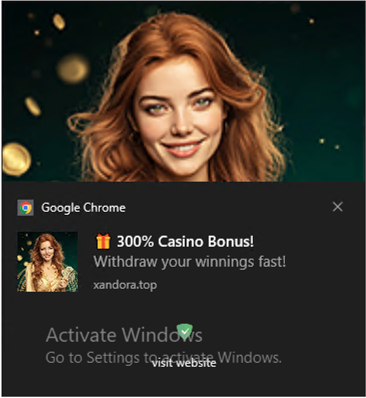
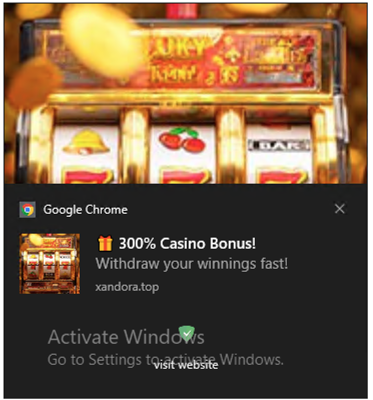
🎁 300% Casino Bonus!
Withdraw your winnings fast!
A real OS notification will appear in ~3 seconds…
What just happened
There is no StreamVault. The "resume playback" pretext was fabricated to make granting notification permission feel necessary. When you clicked Allow, your browser gave this site a permanent channel to send OS-level notifications to your device — bypassing email filters and ad blockers entirely.
This is a real, active attack technique. No video. No content protection.
Just a permission grab.
Why it's dangerous
- Bypasses ad blockers & spam filters. Notifications travel through the browser's native OS channel.
- Persistent. Permission survives tab closes and browser restarts until you manually revoke it. Attackers can push payloads weeks later.
- Works with a Service Worker even when the browser is closed. Real campaigns (Matrix Push C2, Nov 2025) used this as a C2 channel.
- OS-level trust. Notifications look like system alerts, not web content — users click them without thinking.
- Lures are cheap to deploy. Any site can do this in <10 lines of JavaScript, on a fresh domain.
What attackers actually send
Once permission is granted, the notification content is entirely attacker-controlled. Common payloads observed in the wild:
| Payload type | Example lure | Goal |
|---|---|---|
| Gambling / casino spam | "🎁 300% Casino Bonus! Withdraw your winnings fast!" | Drive traffic to affiliate gambling sites for commission |
| Malicious browser extension | "⚠️ Your browser is out of date. Install the security patch now." | Trick user into installing a data-harvesting extension from a fake Chrome Web Store page |
| Malware delivery | "🔒 Your PC is infected. Download the free removal tool." | Land user on a page serving a trojanized installer or info-stealer |
| Phishing | "🔔 Unusual sign-in detected on your Google account. Verify now." | Redirect to a credential-harvesting page mimicking a login screen |
| Fake tech support | "🛑 Critical system error detected. Call Microsoft support: 1-800-XXX-XXXX" | Phone-based scam to extract payment for fake "repairs" |
| Crypto / investment scam | "📈 Elon Musk's AI just predicted the next 10x coin. Limited spots." | Funnel victims into pump-and-dump schemes or fake investment platforms |
| C2 commands | (invisible to user — delivered via silent push to a Service Worker) | Issue instructions to malware already on the device; used by Matrix Push C2 (Nov 2025) |
Mac doesn't show notification well
On Mac, there is no image. And the notification disppears soon. On Windows, the notification will not automatically disappear and shows images. The examples below were captured from real malicious notifications on Windows.
What to do next:
- Remove the notification permission so that it will work again: Settings → Privacy and security → Site Settings → Notifications → remove this origin.
Notification not appearing? How to debug
-
Check browser permission. Open the browser console and run:
console.log(Notification.permission)
Expected output:"granted". If it says"denied"or"default", the permission was not actually granted — revoke and retry. -
Check OS-level permission (macOS). Even if the browser says
"granted", macOS can silently block notifications at the system level.
Go to System Settings → Notifications → [Chrome / Firefox / Safari] and ensure "Allow Notifications" is on. -
Check the console for errors. This page logs
[notif]-prefixed messages. Look for:[notif] onshow fired— notification was displayed successfully.[notif] onerror fired— browser rejected it; check OS settings.- No log at all after "Notification object created" — silently suppressed by macOS; fix in System Settings.
- Focus / Do Not Disturb. On macOS, if Focus or Do Not Disturb is active, notifications are queued and may not appear immediately.
- Check the URL scheme (HTTP vs HTTPS). Managed PAB blocks notifications on plain HTTP — the page must be served over HTTPS. PAB Beta allows HTTP.
- Try a different browser. Safari on macOS requires the site to be added as a Web App (PWA) for push notifications. Use Chrome or Firefox on localhost for reliable testing.